Skip to content

Rev up your passion for Pontiacs and join our vibrant community of enthusiasts!

Whether you're a die-hard fan of classic muscle cars or you've got a soft spot for sleek modern models, you've found your home here at Forever Pontiac. Our community is dedicated to celebrating everything Pontiac, from the iconic GTO to the legendary Firebird and everything in between.

Unlock access to expert advice, stunning photo galleries, engaging discussions, exclusive events, and more!

Start your Pontiac journey with us today!

Sign up now! 🏁

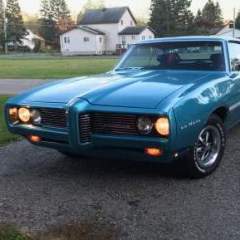
Installing the rocker trim mouldings- '69 LeMans
Featured Replies

So I did some research on the subject and think I know exactly what has to be done; I just need some confirmation about that. I found diagrams on other forums that showed placement and had explanation; the first one here appears to show the placement of all four clips, at each blue line point.

68 ABody.jpg

Then there were these long clips, this image shows placement on the trim but I can't tell where exactly on the car they go. There are only four; two for each side, and so I would assume one clip goes on the rocker under the front fender, where the 350 badge is, and the other, on the rocker under the rear quarter;

68 ABody 3.jpg

And then the small clips themselves; according to one forum, this image below shows the front of the clip, the way it faces into the trim, and that the hole is the top. They stated that on the other side of the clip, that the tab near the lower end usually gets inserted into a hole, and helps keep the clip straight when screwing it on. However since those holes are obviously not present, and drilling more than is needed would be not a good idea, they said you can bend those tabs in and put two-sided tape instead, so you only need to drill for the main screw holes.

noob rocker panel molding question | Pontiac GTO Forum

Hoping that what I have said and shown makes sense; I would imagine the four small clips go on first, and then the two long ones.

Tired of these Ads? Register Today!

Create an account or sign in to comment

Recently Browsing 0

  • No registered users viewing this page.
Tired of these Ads? Purchase Enhanced Membership today to remove them!

Account

Navigation

Search

Search

Configure browser push notifications

Chrome (Android)
  1. Tap the lock icon next to the address bar.
  2. Tap Permissions → Notifications.
  3. Adjust your preference.
Chrome (Desktop)
  1. Click the padlock icon in the address bar.
  2. Select Site settings.
  3. Find Notifications and adjust your preference.